Minimal Cyber Monday countdown template
Digits in JetBrains Mono, a monospaced typeface designed for writing code, in near-black on a very light gray with no boxes. It has a touch of terminal and spec sheet about it, which is why it suits tech or software stores whose Cyber Monday email talks about the product rather than the bargain.
Free style: no signup and no watermark up to 25,000 impressions a month.
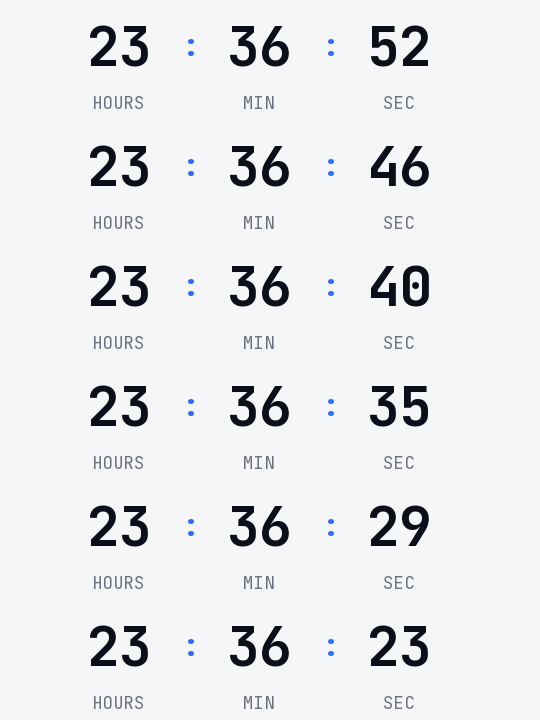
In a monospaced typeface every digit takes up the same width. When the seconds change, the number doesn't shift from side to side, and the timer looks steady even while it moves. The colons are blue and they're the only color.
It shows hours, minutes and seconds, because Monday's offer is measured in hours. If the email goes out on Sunday, the hours absorb the remaining day and the timer reads more than 24.
If your email is pure white or a different gray, switch on the transparent background in the generator and pick your template's color. The engine smooths the edges of the digits against it so no halo is left. When it reaches zero it shows "Cyber Monday is over" or disappears.
It's free and you create it without signing up. It carries no watermark while the timer stays under 25,000 impressions a month. Paste it into a Code block in Mailchimp, an HTML Block in Kit or an HTML block in Brevo.
How to use it
- Press Use this template: the generator on this page already has it loaded.
- Set your campaign's end date and time and check the time zone. Change anything you like: colors, font, units or the closing text.
- Press Create timer, copy the HTML and paste it into an HTML or code block in your email platform.
Create your timer from this template
The generator already has the template loaded. Change the date to your campaign's and press Create timer.

Animated GIF. Recalculated every time the email is opened.
Related templates
-
-
-
-
-
Christmas · Minimal
FREE -
Flash sale · Minimal
FREE