Cyber Monday countdown template with circles
Cyan digits inside dark circles on a teal so deep it's almost black. Cyan is the color most people link to anything digital, and here it sits on the digits themselves, so the time is the first thing you see even with plenty of products around it.
Free style: no signup and no watermark up to 25,000 impressions a month.
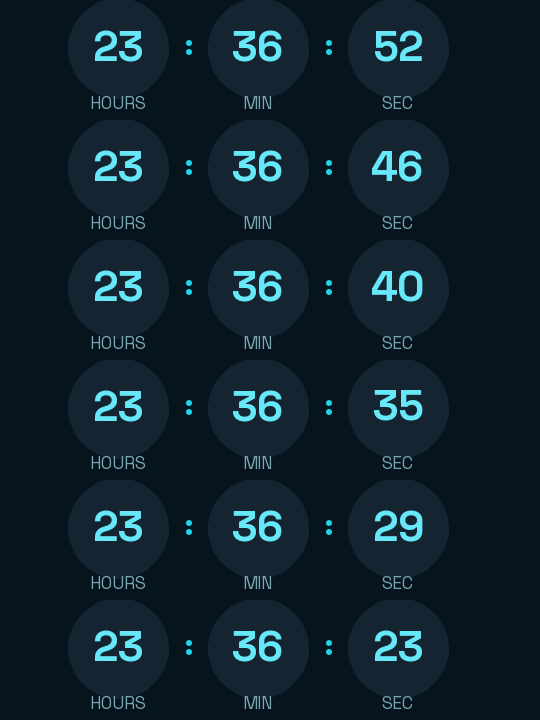
The circles soften it. This is the option for anyone who wants to join Cyber Monday without the clearance-sign tone, such as a subscription brand or an online course that runs a single offer that Monday and explains it calmly.
The digits are set in Space Grotesk, which has a technical edge without feeling cold. It shows hours, minutes and seconds. If you want to use the same timer in the weekend heads-up, there's no need to add days: the hours absorb them, and on Monday morning it reads under 24.
If you decide to extend the offer into Tuesday, edit the timer's date and the emails you already sent will show the new time. If you'd rather Monday's emails keep saying it ended, create another timer for Tuesday. When it reaches zero it shows "Cyber Monday is over".
Rounded is free and carries no watermark up to 25,000 impressions a month. Paste it into a Code block in Mailchimp or MailerLite, or an HTML block in Klaviyo.
How to use it
- Press Use this template: the generator on this page already has it loaded.
- Set your campaign's end date and time and check the time zone. Change anything you like: colors, font, units or the closing text.
- Press Create timer, copy the HTML and paste it into an HTML or code block in your email platform.
Create your timer from this template
The generator already has the template loaded. Change the date to your campaign's and press Create timer.

Animated GIF. Recalculated every time the email is opened.
Related templates
-

-
-
-
-
Christmas · Rounded
FREE -
Flash sale · Rounded
FREE