Christmas countdown template in blocks
This is the countdown for the shipping dates email, the one you send in early December to tell people how long they can still order for delivery before Christmas Eve. Fir green and red say Christmas without snowflakes or glitter, and the boxes keep days and hours clearly apart while there's more than a week to go.
Free style: no signup and no watermark up to 25,000 impressions a month.
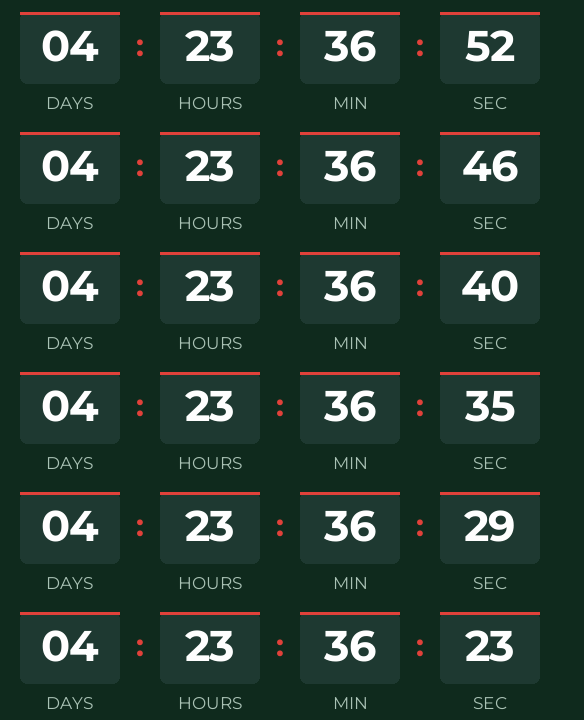
Count down to your last shipping day, not to the 25th, because that's the deadline that changes what a customer does. Take the date your carrier gives you, subtract the time it takes you to pack an order, and put that date and time in the generator. If your warehouse hands parcels over at 2 p.m., set 2 p.m., not midnight.
The digits are set in Montserrat, round and heavy, in white on boxes a shade lighter than the background. Red only shows up in the bar above each box and in the separators.
When it reaches zero it shows "Holiday shipping has ended", which tells people more than "Merry Christmas!" when what has ended is the shipping window. If you extend the cutoff, edit the timer from the same browser or from your free account and the emails you already sent will show the new date.
Blocks is a free style: you create it without signing up and it carries no watermark up to 25,000 impressions a month. Paste it into a custom Liquid section in Shopify Email, an HTML block in Klaviyo or a Code block in Mailchimp.
How to use it
- Press Use this template: the generator on this page already has it loaded.
- Set your campaign's end date and time and check the time zone. Change anything you like: colors, font, units or the closing text.
- Press Create timer, copy the HTML and paste it into an HTML or code block in your email platform.
Create your timer from this template
The generator already has the template loaded. Change the date to your campaign's and press Create timer.

Animated GIF. Recalculated every time the email is opened.
Related templates
-
Christmas · Minimal
FREE -
-
Christmas · Rounded
FREE -
-
-
Flash sale · Blocks
FREE